AWS CDK, (Cloud Development Kit), is an open-source framework to define AWSinfrastructure using programming languages. (E.g. TypeScript, Python, Java, etc.).
How does CDK work?
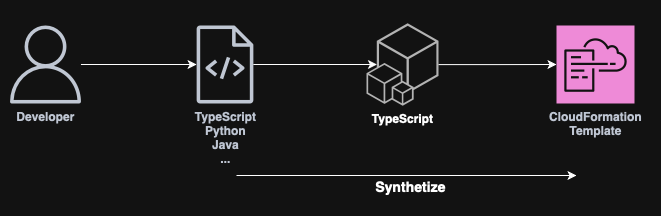
When using CDK, the developers will write code using their preferred language, (e.g. Python).
CDK will then make use of the JSII Compiler, (compiler that takes in code written in other languages and generates TypeScript code), to generate a CloudFormation template.
This process is transparent to the user
Installing CDK
AWS CDK is available to download as an npm package, so nodejsand npmneed to be installed first.
CDK as an npm package
To install CDK as a global dependency, run:
npm install -g aws-cdk
Verify with:
cdk --version
To use CDK, the AWS CLI also needs to be installed and configured with proper credentials.
To configure the AWS CLI, run the following command:
aws configure
This will prompt you with the next steps asking for your AWS credentials. (Use an IAM user with access keys).
Initializing a CDK project
To initialize a new CDK project, the following needs to be run inside an empty directory:
cdk init app --language <language>
Note: Replace <language> with the actual language, such as python, typescript, etc.
This command will generate a template inside the folder such as the following:
| .venv -> Virtual environment folder for Python dependencies.| tests -> Directory for the project’s unit and integration tests.| .gitignore| app.py -> Main entry point for the CDK application (where stacks are defined).| cdk.json -> CDK toolkit configuration (e.g., app entry point, context, etc.).| README.md| requirements-dev.txt -> Python dependencies for development (e.g., testing, linting).| requirements.txt -> Python dependencies for runtime (e.g., `aws-cdk-lib`).| source.bat -> Windows) Helper script to activate the virtual environment.
Synthesizing code to CloudFormation
In order for CDK to synthesize the written code into CloudFormation stacks, the following command needs to be run:
cdk synth
Note: Follow the instructions on the README.mdfile in order to perform this command.
Bootstraping CDK
Bootstrapping AWS CDK is the process of preparing the AWS environment so that AWS CDK can deploy resources on one’s behalf.
To bootstrap CDK, run:
cdk bootstrap <account-id>/<region>
In order for bootstrap to succeed, the following permissions need to be added to the CDK IAM User:
Make sure that your IAM User can assume the generated CKD roles. Otherwise, commands such as cdk deploy will fail with a warning similar to this one:
current credentials could not be used to assume 'arn:aws:iam::000000000000:role/cdk-hnb659fds-file-publishing-role-000000000000-eu-west-1', but are for the right account. Proceeding anyway.