What is Amazon S3?
Amazon S3 (short for Amazon Simple Storage Service) is a cloud storage service that allows for object, (files), storage in buckets, (directories), and is advertised as “infinitely scaling” storage.
Here is an analogy
Think of it as a giant, secure, online hard drive that apps and people can access over the internet.
Note: S3 buckets are defined at a region level, it is not a global service. However, bucket names must be unique across all regions and AZs.
S3 buckets are used for:
- Backup & Storage;
- Disaster recovery;
- Archive;
- Hybrid cloud storage;
- Application hosting;
- Media hosting;
- Data lakes & Big data analytics;
- Software delivery;
- Static websites.
What is inside an S3 Bucket?
All S3 Buckets are composed by S3 objects. Officially, there is no concept of a directory in an S3 Bucket, there are only, keys and objects.
An object is a file, that has a key which represents it’s path in the bucket.
This key is composed of a prefix + the object name:
              # Key                    # Object
s3://my-bucket/my_folder/another_folder/my_file.txt
S3 Object Versioning
S3 buckets are able to version objects if the versioning is toggled on. This will create a new version of the object each time it is updated.
S3 Bucket Replication
An S3 bucket can be replicated to another S3 bucket.
For this to happen, versioning must be enabled in both the source and destination S3 Buckets.
The replication happens asynchronously and can be performed in the same or another region.
Note: This can be done between different AWS accounts.
S3 Bucket Security
There are a few types of security enforcements that can be applied to S3 buckets:
- User Based:
- IAM policies - Which API calls should be allowed for a specific IAM user.
- Resource Based:
- Bucket Policies - Bucket wide rules from the S3 console. Allows cross account;
- Object Access Control List (ACL) - Finer grain (can be disabled);
- Bucket Access Control List (ACL) - Less common (can be disabled).
- Encryption:
- Encrypts objects in S3 using encryption keys.
S3 Storage Classes
Amazon S3 can have one of the following storage classes:
| Standard | Intelligent Tiering | Standard IA | One zone IA | Glacier Instant Retrieval | Glacier Flexible Retrieval | Glacier Deep Archive | |
|---|---|---|---|---|---|---|---|
| Durability | 99.999999999% | 99.999999999% | 99.999999999% | 99.999999999% | 99.999999999% | 99.999999999% | 99.999999999% |
| Availability | 99.9% | 99.9% | 99.9% | 99.5% | 99.9% | 99.99% | 99.99% |
| Availability SLA | 99.9% | 99% | 99% | 99% | 99% | 99.9% | 99.9% |
| Availability Zones | >= 3 | >= 3 | >= 3 | 1 | >= 3 | >= 3 | >= 3 |
| Min. Storage Duration Charge | None | None | 30 Days | 30 Days | 90 Days | 90 Days | 180 Days |
| Min. Billable Object Size | None | None | 128 KB | 128 KB | 128 KB | 40 KB | 40 KB |
| Retrieval Fee | None | None | Per GB retrieved | Per GB retrieved | Per GB retrieved | Per GB retrieved | Per GB retrieved |
S3 Standard - General Purpose
- 99.9% availability;
- Used for frequently accessed data;
- Low latency & throughput;
- Can sustain 2 concurrent facility failures;
- Use cases: Big Data analytics, mobile & gaming applications, content distribution, etc.
S3 Infrequent Access (IA)
- Used for data that is less frequently accessed but required rapid access when needed;
- Lower cost that the S3 Standard class.
Standard IA
- 99.9% availability;
- Use cases: Disaster recovery, backups.
One Zone IA
- 99.5% availability;
- Data is lost if AZ is destroyed;
- Use cases: Storing secondary backup copies of on-prem data, or data that can be re-created.
S3 Glacier
- Low cost object storage meant for archiving/backup;
- Pricing: Price for storage + object retrieval cost.
Instant Retrieval
- Millisecond retrieval, great for data accessed once a quarter;
- Minimum storage duration is 90 days.
Flexible Retrieval (Former S3 Glacier)
- Multiple free retrieval options:
- Expedited (1-5 minutes);
- Standard (3-5 hours);
- Bulk (5-12 hours).
- Minimum storage duration is 90 days.
Deep Archive
- Multiple free retrieval options:
- Standard (12 hours);
- Bulk (48 hours).
- Minimum storage duration is 180 days.
S3 Intelligent-Tiering
- No retrieval charges;
- Small monthly monitoring and auto-tiering fee;
- Moves objects automatically between the following access tiers based on usage:
- Frequent Access Tier: Default tier;
- Infrequent Access Tier: Objects not accessed for 90 days;
- Archive Instant Access Tier: Objects not accessed for 90 days;
- Archive Access Tier (optional): Configurable from 90 days to 700+ days.
- Deep Archive Access Tier (optional): Configurable from 180 days to 700+ days.
S3 Transfer Acceleration
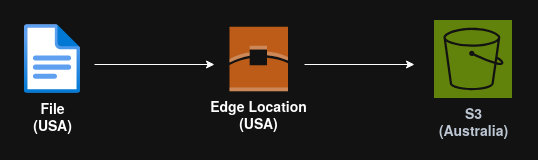
It uses the Amazon CloudFront global network of edge locations as a proxy.
Amazon Athena (Analytics)
Amazon Athena is a serverless query service to perform analytics against S3 objects.
Is uses standard SQL language to query the files and supports CSV, JSON, ORC, Avro and Parquet.
