What is Route 53?
Route 53 is Amazon’s scalable DNS web service.
It is also possible to register new domains using Route 53. (Registrations have an associated cost).
Note: Route 53 is the only AWS service with 100% availability SLA.
Fun fact
This service is called Route 53 as a reference to the DNS port, (53).
Hosted Zones
The concept of a hosted zone corresponds to a container of records that define how traffic is routed to a domain and subdomains.
Note: Hosted zones have a cost of 0.50$ per month.
There are two types of hosted zones:
Public Hosted Zones
These contain records that can be resolved by the public internet.
Private Hosted Zones
These contain records that can only be resolved from inside a VPC.
Record Types
When registering new records, these can have the following types:
- A - Maps a hostname to IPv4;
- AAAA - Maps a hostname to IPv6;
- CNAME - Maps a hostname to another hostname;
- Alias (Route 53–specific) – Maps a hostname **to an AWS resource;
- NS - Name servers for the hosted zone.
Aliases vs CNAME records
A CNAME and an Alias often appear similar because both can make one domain “point to” another target. The difference is that CNAME records map a domain to another domain, while aliases, map a domain to an AWS resource.
Note: These are not all types that can be configured, but are the main ones.
Health Checks
Health checks continuously monitor the health and performance of resources (e.g. EC2, API endpoints) and make routing decisions based on their status.
They help ensuring that DNS only returns healthy endpoints, improving availability and reliability.
Routing Policies
Route 53 has four main routing policies:
Simple Routing
- Returns a single resource IP address for a DNS query;
- Use case: When there is only a single resource to route traffic to, with no special routing logic.

Note: If multiple values are returned, a random one will be chosen by the client.
Weighted Routing
- Distributes traffic across multiple resources according to assigned weights (percentages);
- Can be paired with health checks.
- Use case: For load balancing, testing new versions or gradually shifting traffic between endpoints.
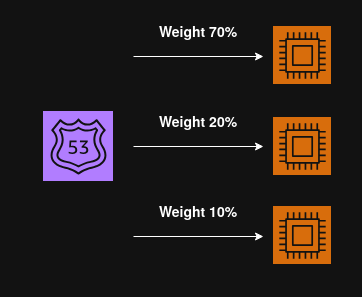
Weight 0
When a record is assigned a weight of 0, it will stop receiving traffic. When all records are assigned a weight of 0, all of them will be returned with equal weights.
Latency Routing
- Routes traffic to the resource that provides the lowest latency (fastest response time) for the user’s location;
- Can be paired with health checks.
Latency
Latency is based on traffic between users and Regions.
- Use case: Improve user experience by directing them to the closest or fastest AWS region.
Geolocation Routing
- Routes traffic based on user location. Traffic is routed to a specific record based on where the user is connecting from.
- Requires a default record, (in case no match found).
- Can be paired with health checks.
Different from latency routing.
While the latency routing policy routes traffic based on latency, ensuring that the user has the fastest connection available, the geolocation policy does not.
- Use case: Website localization, restricting content distribution, etc.
Geoproximity Routing
-
Routes traffic based on the distance between the user and AWS resources (such as regions or on‑prem endpoints).
-
This policy is used to shift traffic toward a specific resource by applying a bias (positive or negative).
- Positive bias - expands the geographic area served by the resource.
- Negative bias - shrinks the geographic area served.
-
Can be paired with health checks.
-
Use case:
- Gradually shift traffic between regions (e.g., during migrations or blue/green deployments).
- Serve users from the closest infrastructure while retaining control over how much traffic each endpoint receives.
Failover Routing
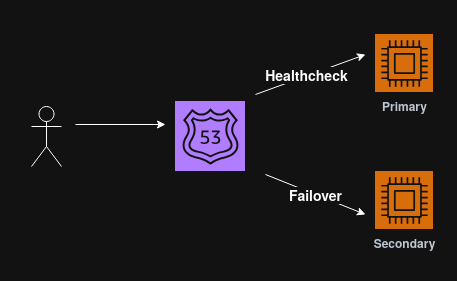
- Provides active-passive failover. Traffic is routed to the primary resource unless it’s unhealthy, then it fails over to a secondary resource.
- Can be paired with health checks.
- Use case: High availability and disaster recovery.
IP Based Routing
- Routes traffic based on users IP addresses.
- A CIDR list is used to filter user IPs and route them to specific locations.
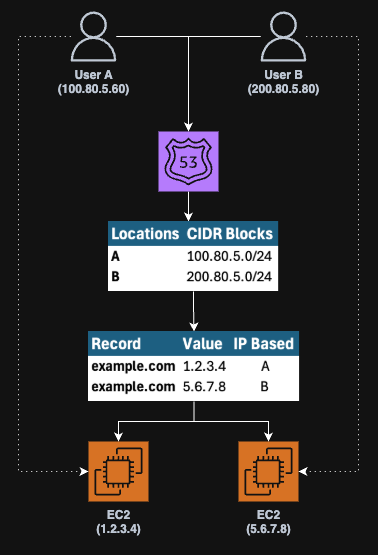
- Use case: Performance optimization, reducing network costs.