What is high availability, scalability & elasticity?
High Availability refers to a system’s ability to remain operational and accessible without interruption for a minimum amount of time, even in the event of failures, (e.g. hardware, software or network failures).
Scalability refers to the ability of a system to accommodate a larger load by making the hardware stronger, (scaling up), or by adding nodes, (scaling out).
Elasticity means that, once a system is scalable, there will be some form of auto-scaling so that the system can scale based on it’s current load.
Types of scalability
There are two types of scaling in the cloud:
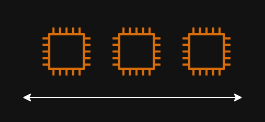
Horizontal Scaling
Horizontal scaling means increasing the number of instances/systems of an application.
It is possible to scale in, (decreasing the number of instances), or scale out (increasing the number of instances).
Vertical Scaling
Vertical scaling means increasing the size of a single instance to handle more load.
It is possible to scale down, (decreasing the size of the instance), or scale up (increasing the size of the instance).

What is load balancing?
Load Balancing is the process of distributing incoming network traffic across multiple resources/servers to ensure that no single server becomes overwhelmed and to maximize performance, reliability and availability. (Ensuring high availability across zones and seamlessly handling failures in instances)
Other advantages of using a load balancer include:
- Exposing a single point of access (DNS), to an application;
- Performing regular health checks to instances;
- Providing SSL termination (HTTPS) to websites.
What load balancing services does AWS provide?
A load balancer in AWS is known as an “Elastic Load Balancer”, (ELB).
An Elastic load balancer is a managed load balancer, (meaning that AWS guarantees that it will be working and takes care of upgrades and maintenance).
It is more expensive that setting up a load balancer manually, but it also takes much less effort.
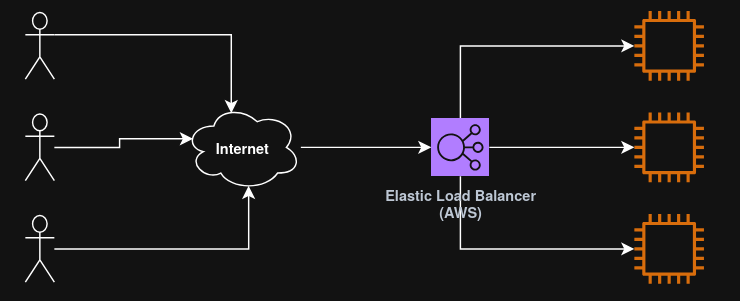
ELB is integrated with many AWS services, such as EC2, ECS, CloudWatch, etc.
AWS offers 4 types of load balancing services, all part of ELB. These are:
Classic load balancer (Legacy)
The Classic Load Balancer is AWS’s original, first‑generation load balancer.
It provides basic layer 4 (TCP) and layer 7 (HTTP/HTTPs) load balancing but lacks the advanced routing, performance, and features available in modern AWS load balancers such as ALB, NLB, and GWLB.
Use cases
A classic load balancer is suitable only for legacy environments that require:
- Compatibility with older architectures (e.g., EC2‑Classic era components);
- Very simple HTTP or TCP load balancing;
- No requirement for advanced routing features.
- Most modern AWS architectures should not deploy CLB.
AWS officially categorizes it as one of the four ELB types but positions it as legacy for existing workloads only.
Application load balancer (ALB)
The application load balancer provides layer 7 (HTTP) load balancing, allowing for:
- HTTP routing to multiple machines, (target groups);
- HTTP routing to multiple applications on the same machine, (e.g. ECS).
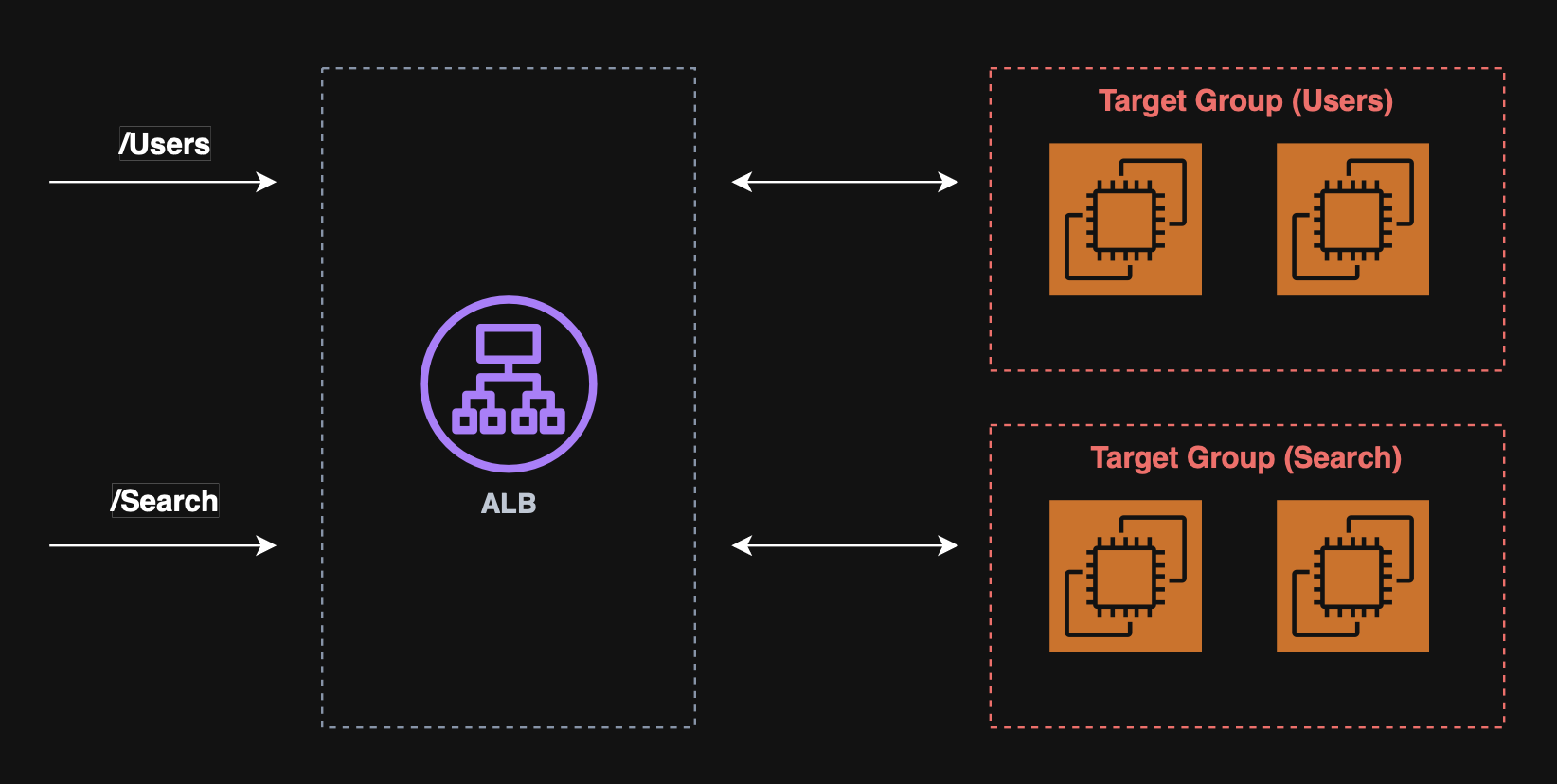
The ALB supports:
- HTTP/2 and WebSocket;
- Redirects, (e.g. HTTP to HTTPs);
- Routing tables to different target groups based on:
- URL;
- Hostname;
- Query string;
- Headers.
Use cases
An ALB is suited for micro services and container based applications.
ALB target groups:
- EC2;
- ECS tasks;
- Lambda functions;
- IP addresses.
Network load balancer (NLB)
The network load balancer provides layer 4 (TCP/UDP/TLS) load balancing, designed for extremely high performance and ultra‑low latency, making it suitable for millions of requests per second and latency‑sensitive workloads.
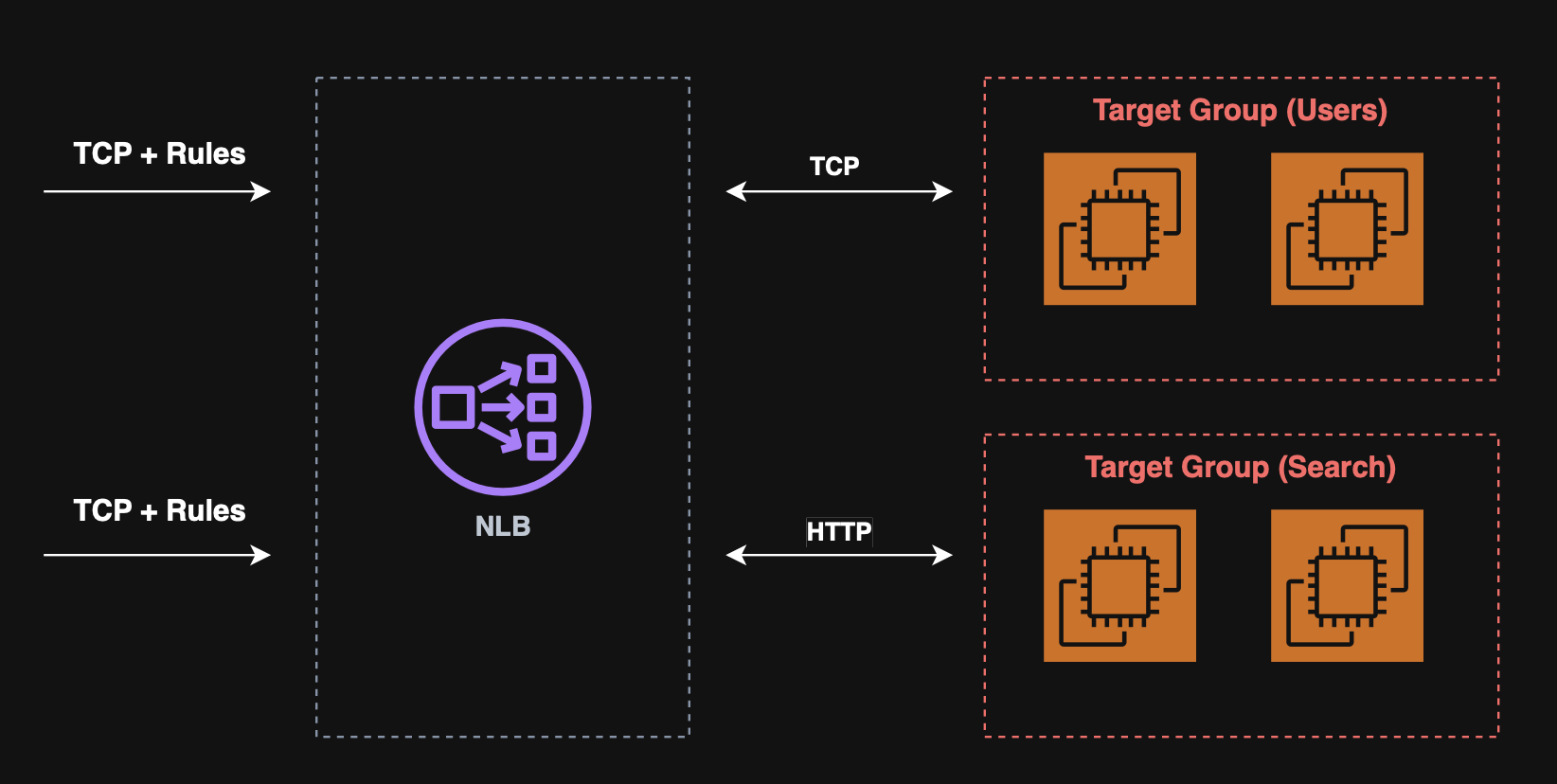
Note: NLB has a single static IP per AZ and supports Elastic IPs.
NLB target groups:
- ALB;
- EC2;
- Private IPv4.
Gateway load balancer (GWLB)
The Gateway Load Balancer provides Layer 3 (IP packet level) load balancing, designed specifically for deploying, scaling, and managing third‑party virtual network appliances such as firewalls, intrusion detection/prevention systems (IDS/IPS), deep packet inspection (DPI) engines, and traffic analyzers.
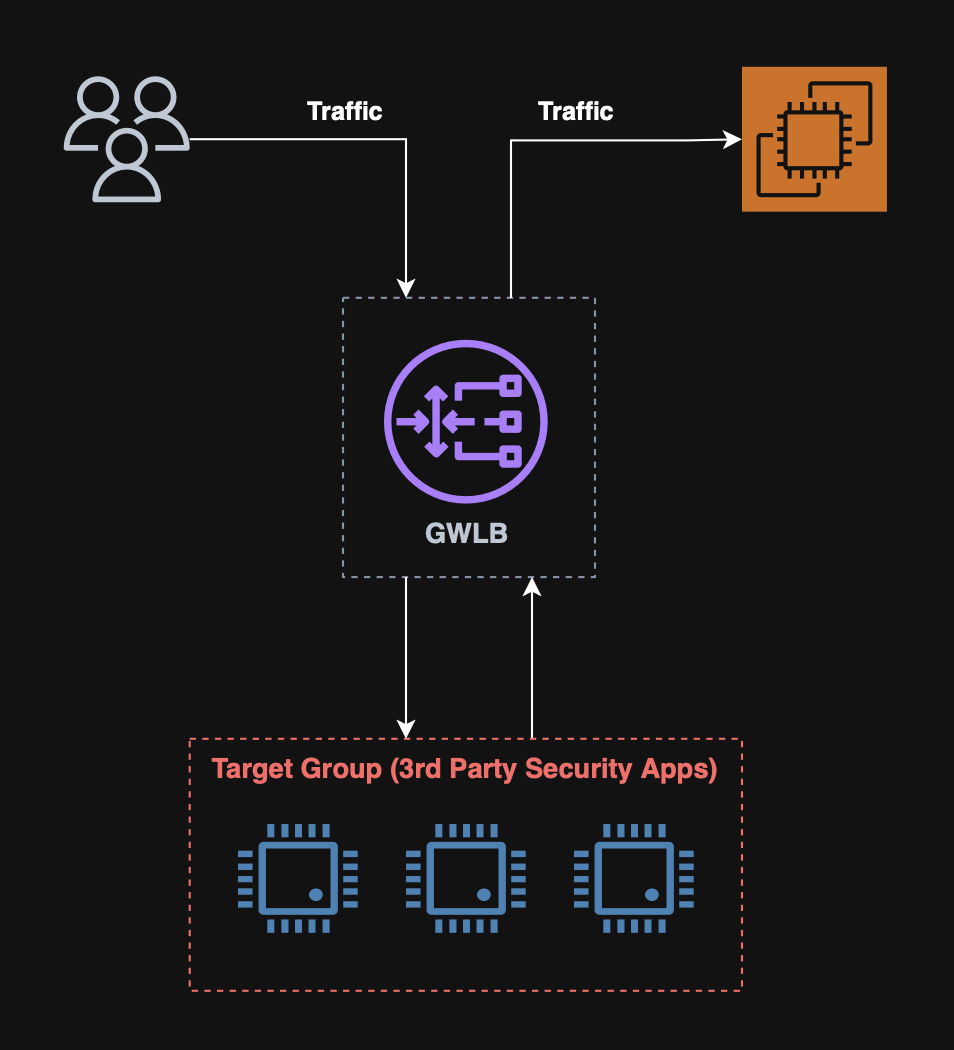
It forwards all traffic to a fleet of appliances and back without altering network routing.
Use cases
A GWLB is suited for the following use cases:
- Enterprise firewalls (Fortinet, Palo Alto, Check Point);
- Intrusion detection and prevention systems (IDS/IPS);
- Deep packet inspection (DPI) engines;
- Threat detection and network forensics;
- Transparent network inspection for multi‑AZ/multi‑VPC architectures.
GWLB target groups:
What is auto scaling?
Auto scaling in AWS is a service that automatically adjusts the amount of compute capacity that an application uses, ensuring that it always has the right number of resources at the right time.
It helps maintain performance during traffic spikes and reduce cost during low‑usage periods.
How do auto scaling groups work?
An auto scaling group, (ASG), is a core component of Amazon EC2.
It automatically launches, terminates, replaces, and balances EC2 instances to keep application running with the right capacity at all times.
AWS states that Auto Scaling Groups ensure that we always have the correct number of EC2 instances available to handle the load.
Configuring the number of instances
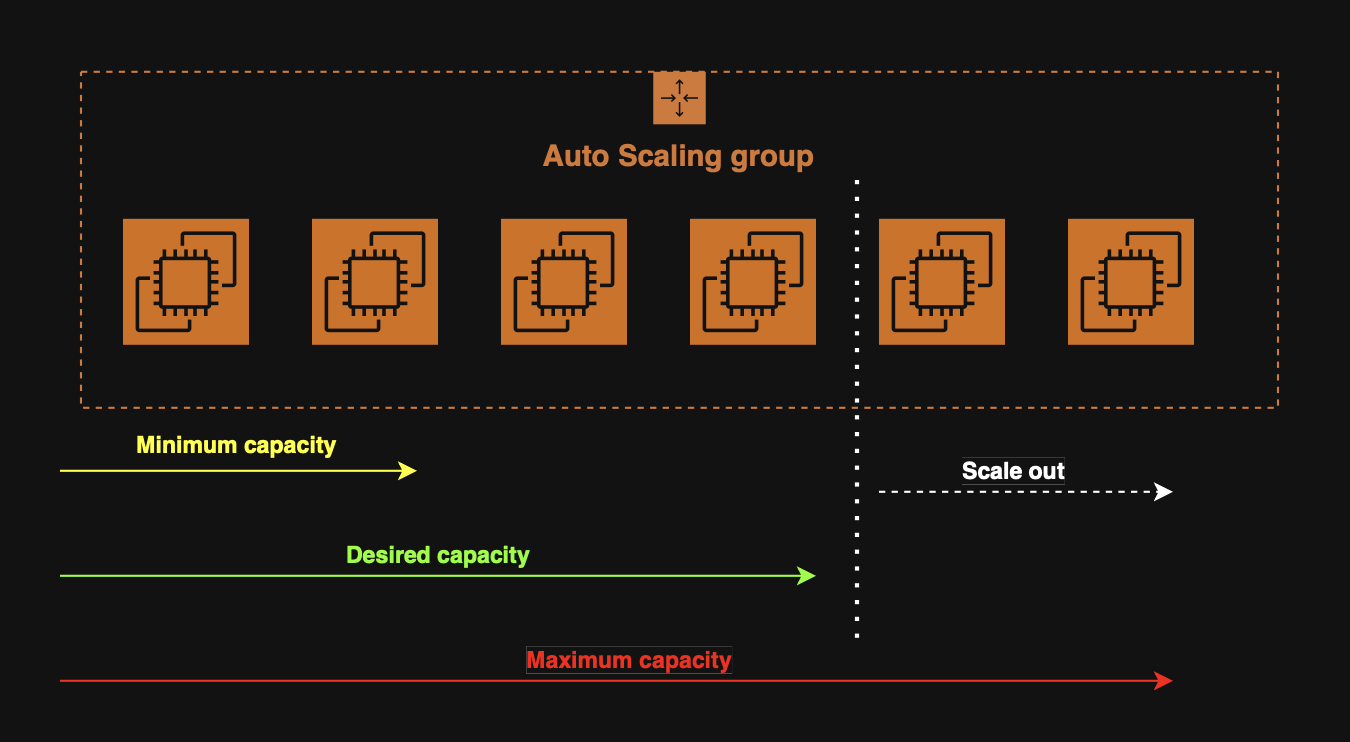
When creating an ASG, we configure three numbers:
- Minimum capacity - The group will never go below this;
- Maximum capacity - The group will_never exceed this;
- Desired capacity - The number of instances that should be running normally.
Configuring the launch template
The ASG needs a template describing how to launch new instances.
These launch templates include the following:
- AMI (OS image);
- Instance type;
- Security groups;
- User data scripts;
- Networking configuration.
Scaling policies
AWS provides four main types of scaling policies for ASGs.
These policies determine when and how the ASG should add or remove instances based on specified metrics.
When required, the ASG will scale horizontally, (in or out), to keep the metrics set by the policies as desired.
Scaling cooldowns
After a scaling activity occurs, the ASG will enter a cooldown period, (default 300 seconds). During which, no instances will be launched or terminated.
Target tracking scaling
A target tracking policy keeps a metric (e.g. CPU%, request count per target, etc.) at a specified target value.
Analogy
Target tracking metrics are similar to how a thermostat maintains a temperature.
Step scaling
A step scaling policy executes different scaling actions depending on how far a CloudWatch alarm metric deviates from a threshold.
E.g. When CPU > 70%, add 1 instance.
Scheduled scaling
A scheduled scaling policy adjusts capacity based on a predefined time schedule rather than metrics.
E.g. At 17:00, (spike usage), add 1 instance.
Predictive scaling
A predictive scaling policy uses ML to forecast demand and provision capacity ahead of time.